February 7th, 2026
New

We dropped two HUGE updates that are going to change how you research content.
And honestly? This is exactly what I've been wanting to build for months.
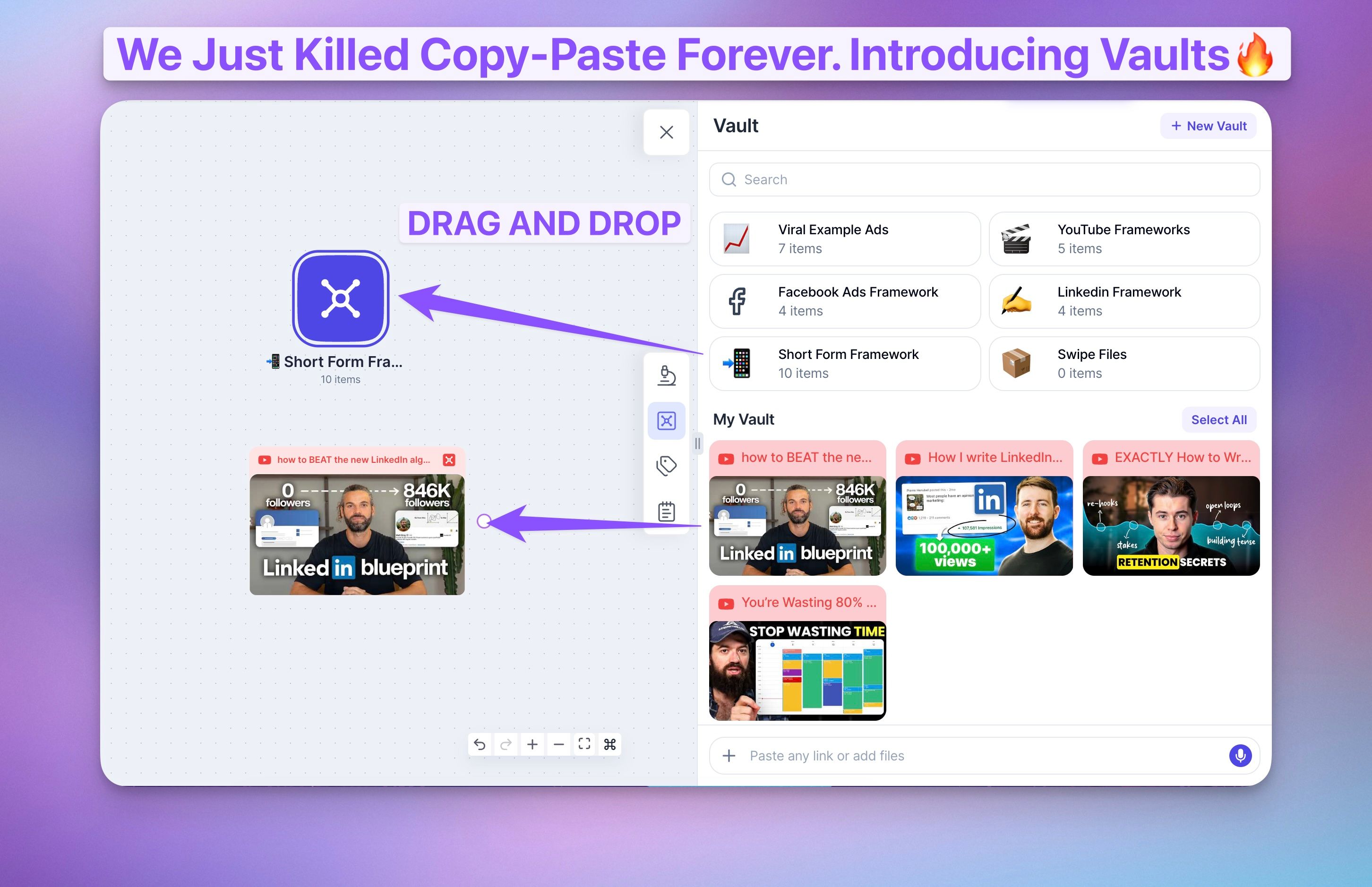
You can now paste in full YouTube channels into Poppy.
Here's what happens:
π We analyze the latest titles from that channel
π We analyze the most popular titles from that channel
π You ask Poppy to build a framework on how that creator makes titles
π Then paste in YOUR channel and ask Poppy what titles YOU should create
This is HUGE because titles are everything. A good thumbnail and a good title = a good YouTube video.
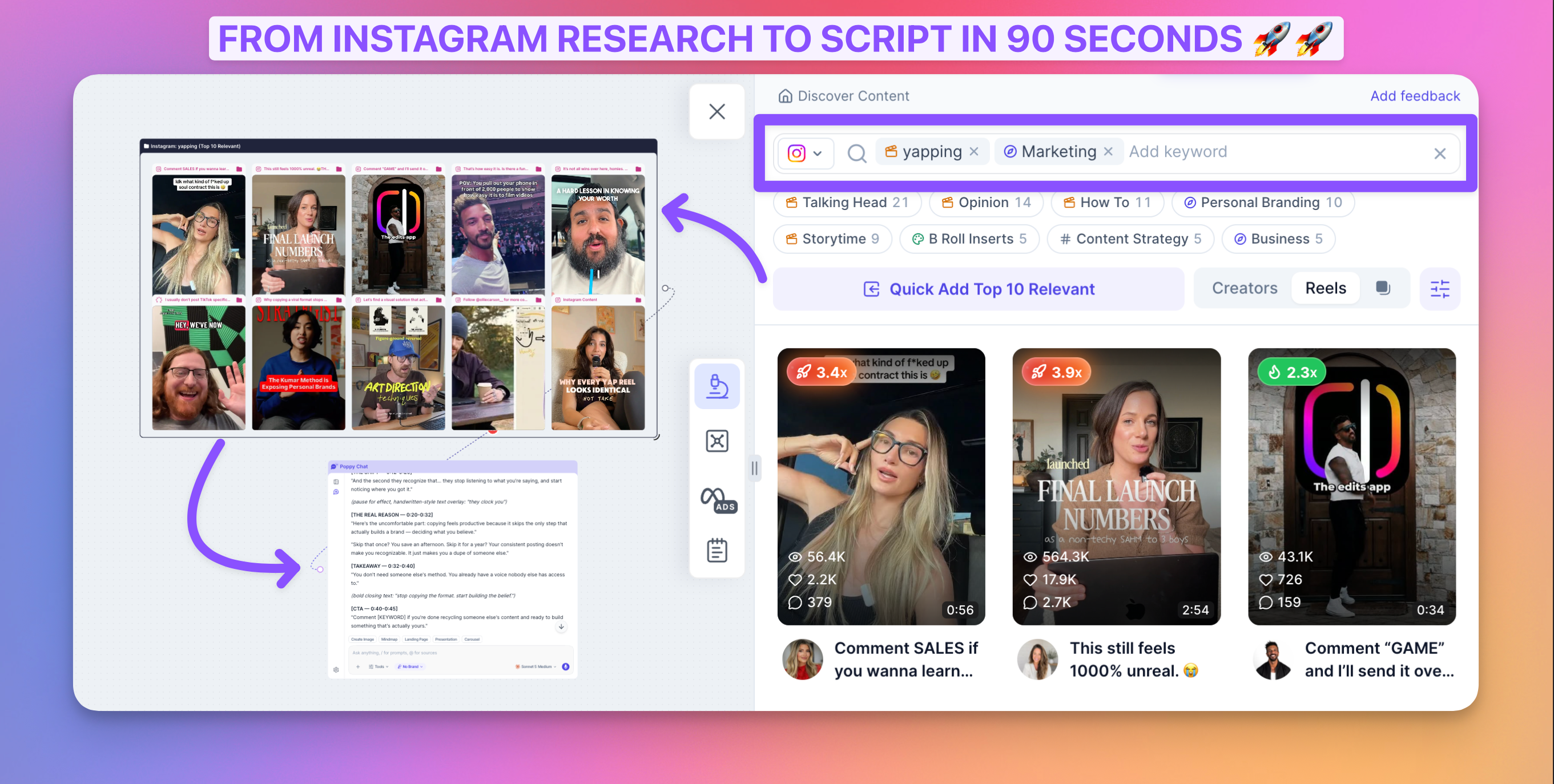
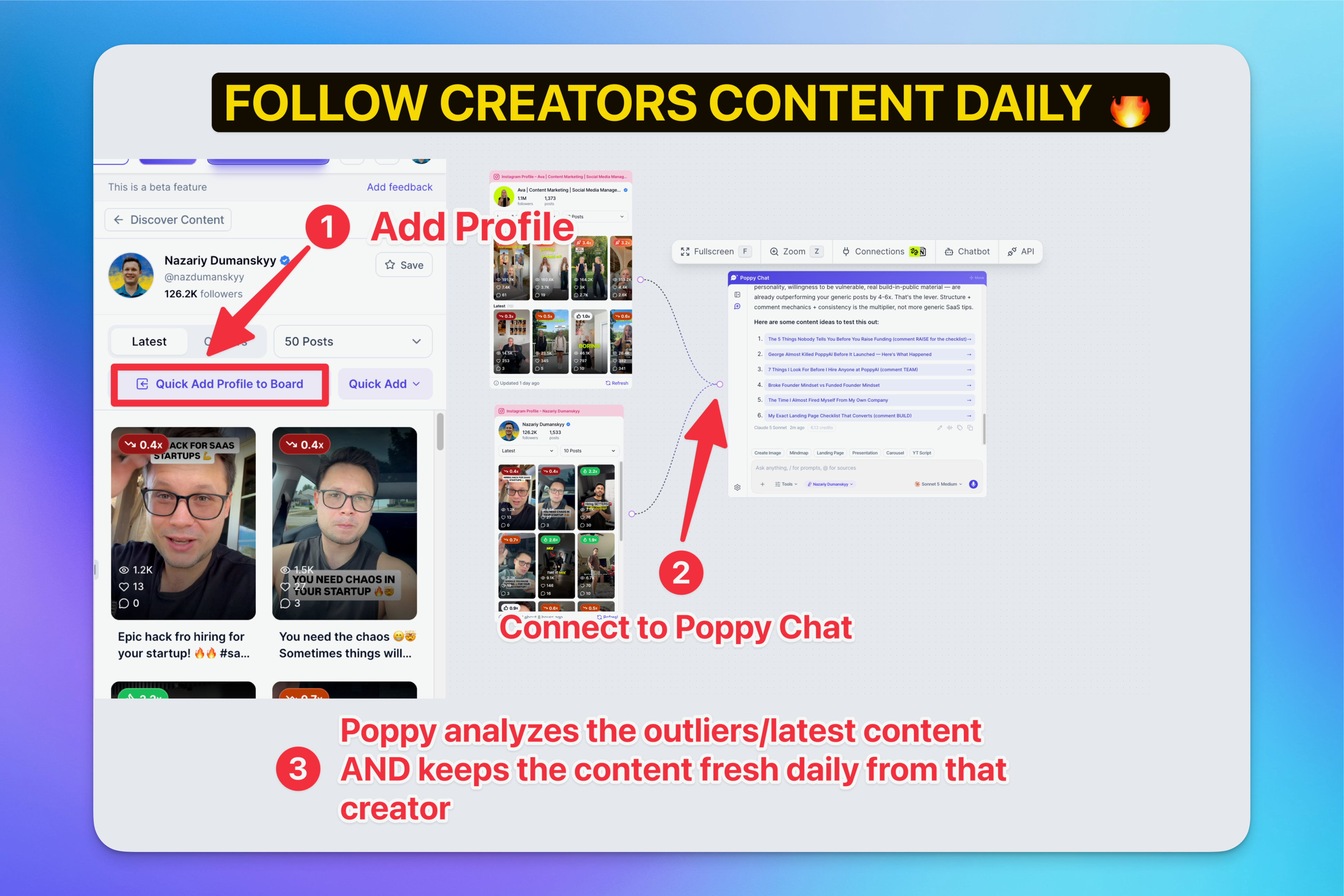
You can now paste in full Instagram channels into Poppy.
Here's what you get:
π We show you all the videos and posts from that channel
π You can drag and drop them into Poppy AI
π Model their content, learn from their hooks, learn from their structure
π Create your own viral content based on what's already working
Our goal is to let you discover outliers and auto-import 10-20 videos into Poppy to track outlier content in specific niches.
The same thing is coming for YouTube videos.
We genuinely believe we can create the best research and writing experience for content creators. Period.
And we're not stopping here...
We're working on the mobile app and probably one of the best writing experiences of your life.
DROP A β€οΈ if you will find this helpful!
P.S. We do Community calls teaching you how to create content, thumbnails, scripts, with Poppy every Tuesday!
Love ya,
- Naz
January 25th, 2026

AI isn't going to replace designers.
But it sure as hell can help non-designers.
From my perspective, I've spent HOURS trying to create thumbnails in Canva.
I've also spent hundreds of dollars paying designers for a single thumbnail.
And it's always frustrated me because I knew AI could help here.
It's not the ultimate solution. But it's a damn good start.
That's why we integrated Google's Nanobanana Pro into Poppy.
Iβve tested it myself - pasted in a thumbnail I liked, uploaded my photo, and asked it to recreate the style with my face.
It took 10 seconds.
Is it perfect? No. But it's way better than spending hours in Canva or waiting days for a designer.

Click on "Create Image" in Poppy Chat
Paste in a YT video or image you want to model
We automatically grab that thumbnail
Paste in an image of yourself
Tell Nanobanana Pro what you want to create
The image appears on the right side automatically π¨
And it does it by itself.
That's literally all you have to do.
Thumbnails - Model any YouTube thumbnail and make it your own
Image Posts - Create posts based on other IG posts
Carousels - Generate multiple slides for Instagram/LinkedIn
Ads - Create professional ad creatives in seconds
Banners - Make website headers, channel art, whatever you need
Just connect different image posts or IG reels directly to Poppy Chat and Nanobanana Pro uses them to create content specifically for you.
Create a fire thumbnail with Nanobanana Pro. Comment it below. Winner gets $500.
You have until January 31st.
Most upvoted thumbnail wins.
π Create your thumbnail with Nanobanana Pro
π Take a screenshot of your Poppy AI board showing how you generated it
π Comment below with your thumbnail + screenshot
π Get people to upvote your comment
May the best thumbnail win π
Love ya,
-Naz
December 4th, 2025

I'm just gonna be real with you.
I fucking hate building Dark Mode
In fact, I fought Qazi against releasing it because I knew it wasn't 100% there yet π₯
But then...
I was using Poppy late at night, eyes burning, squinting at my screen like an idiot.
I switched to Dark Mode Beta and my eyes just... rested.
And I realized - you know what?
Even if it's not perfect, if it helps people's eyes at night, it's worth releasing.
So I called David, our crazy PM, and said: "Release the Kraken." π
(I actually just said "turn it on for everyone" but that's way less dramatic π)
Click your profile in the top right corner
Select Dark Mode
Done! Your eyes will thank you π
Building Dark Mode is WAY harder than people think:
Every single color needs to be properly picked
Every new feature we build now takes DOUBLE the time to support both light and dark modes
We don't have the dev capacity to make it perfect right now.
But I'd rather give you something that helps than wait for perfection.
Please don't spam us with "these colors look weird." Trust me, I know. We'll keep improving it.
But if you have helpful suggestions, drop them in our feedback.getpoppy.ai- we're always in there reading and responding!
P.S. If you know any talented devs who want to help us make Dark Mode even better, text me at 248-890-8895!
Trust me, WE NEED DEVS! π
DROP A β€οΈ if youβre pumped for Dark Mode!
Love ya,
- Naz
November 29th, 2025

Happy Holidays Poppy fam β€οΈ
We've got some goodies for you!
You can now paste any public Loom link directly on the board and Poppy will listen to it π!
Perfect for:
Analyzing client feedback without watching the same video 47 times
Breaking down tutorial content into actionable steps
Turning your own Loom recordings into blog posts, scripts, or whatever you need
We cleaned up the AI chat interface because honestly, it was looking a bit old π
What's new:
Cleaner UI/UX - Way easier on the eyes
Quick scroll to bottom
Copy your own prompts - Reuse your genius prompts with one click
Any other integrations you want us to add? π€
DROP A π₯ if you're pumped about Loom support!
November 15th, 2025

Nothing crazy haha but for the twitter people out there, is going to CRUSH π₯
Twitter/X posts are NOW supported in Poppy! π₯
Just paste (Cmd + V) any tweet link into your board and BOOM - Poppy breaks it down automatically.
Analyze viral tweets, study competitor content, or model what's working in your niche.
It's that simple!
P.S. Now you can analyze content from LinkedIn, Instagram, Facebook, TikTok, AND Twitter/X. We're basically covering the entire internet at this point! π
Loom support coming soonπ
Alsoβ¦
anybody else having a hard time calling Twitter, X?
Itβs been so long, and I still call it Twitter haha
would love your thoughts below π π
-Naz
October 14th, 2025

The Poppy Dashboard Just Got a MASSIVE Glow-Up π
We've been cooking something SPICY in the background...
Our dashboard was looking a bit... let's say outdated. π
So we said F*CK IT - let's make this thing BEAUTIFUL!
Watch this Loom Video to see it in action π
π¨ Cleaner Look - No more cluttered mess. This thing is now CRISP AF
π See More Boards - You can actually see all your projects without squinting like you're reading fine print
haha I know long time coming!

THE BEST PART?
You don't have to learn anything new π§
Same Poppy magic
IT JUST LOOKS CLEAN β¨
Go check it, drop a π₯ in the comments below π
And please let us know if you got any suggestions!
Because we are working to make the dashboard even better!
P.S. Poppy is looking for a talented UI/UX designer to take us to the next level
If you know anybody please text Naz at +1-248-890-8895
Enjoy,
- David
October 3rd, 2025

LONG TERM Goal with Poppy is SIMPLE:
We want Poppy to be the ONE AND ONLY tool you use for CREATING CONTENT, growing your business and MAKING MONEY π€
We know you already love Poppy for:
β
ideating
β
researching
β
scripting
β
creating emails
and NOW, thanks to Kaustubh, our developer, you can also create LANDING PAGES in Poppy π₯
You can create:
π Lead Magnets
π Sales Pages
π Hiring Pages
all from within Poppy
But it gets better!
1οΈβ£ Brainstorm your idea with Poppy (like you always do)Β
2οΈβ£ Click the "Landing Page" button above the chat input and write a short prompt
3οΈβ£ Watch Poppy do the MAGIC and turn your context into a beautiful page

No more Webflow. No more Framer. No more wasting hours on simple pages.
THE BEST PART?
Poppy already has ALL the context from your brainstorming session
Unlike other tools that start from scratch, Poppy KNOWS what you've been working on
It's like having a designer who was listening to your entire strategy session π§
β οΈ NOW, DISCLAIMER β οΈ
This is our FIRST version of landing pages
Don't expect Webflow-level customization (yet) haha
But for quick, converting pages that actually work?
THIS SHIT IS FIRE π₯
Enjoy,
- Naz
August 30th, 2025

LONG TERM Goal with Poppy is SIMPLE
π research
π ideate
π create
π post
π MAKE MONEY πΈ
We want Poppy to be the ONE AND ONLY tool you use for CREATING CONTENT & growing your business πͺ
We know you already love Poppy for ideating, researching, scripting, and creating emails
But for the first time EVER Poppy is going into VISUAL Creation π₯
You now will be able to create Images, image posts, ads, even YT Thumbnails all within Poppy!
But it gets better!
you can model other posts, just like you can model other scripts π€―
1οΈβ£ paste the link from a IG, TikTok, or YouTube video
2οΈβ£ Connect to chat
3οΈβ£ model the image with your own style
In fact, we tested it recently on our own IG channel
We modeled after a Alex Hormozi post π
That post is now at 20K VIEWS π₯
And it required no Photoshop π
Watch this video on how to use it π
Connect any inspiration you want:
π YouTube video (for thumbnail modeling)
π Instagram Image Post
π TikTok Post
π Regulate image
Just click the Create Image button in any chat block
Type your vision (like "model this youtube thumbnail but with my face on it" or "Create for me a post for hiring using the image provided")
WATCH Poppy do the MAGIC π₯
NOW, DISCLAIMER β οΈ β οΈ
WE use ChatGPT under the hood for creating images
So donβt come yelling at my team if the image is not perfect haha
yell at the OpenAI team π€£
THIS is the first step Poppy is taking in visual image creation!
Only matter of time before we add new AI models like Nano Banana
AAAAAND
We are specifically working on a particular model for creating AMAZING thumbnails! π
Here is what I want you to do
π create your first image AD or post
π post it
π give us feedback on how we can improve
Enjoy,
- Naz
June 30th, 2025

You know that feeling when you're staring at your board thinking "I REALLY need to explain this part right here"?
Well, our dev team heard your brain screaming and said "Hold my coffee" β
Meet the ANNOTATION BLOCK - because sometimes you need to point at stuff and actually say something useful about it! π―
!Perfect for adding context without connecting to AI - this is purely for human collaboration
π YOUR NEW SUPERPOWERS:
β
Highlight specific areas directly on your board
β Add context exactly where it matters
β Perfect for team collaboration and feedback
β No more "see that thing over there" confusion
β Clean, focused explanations right on the spot
β NOT connected to AI - pure annotation power for humans
π― HOW TO BECOME AN ANNOTATION MASTER:
1οΈβ£ Add a new block to your board
2οΈβ£ Select "Annotation Block" OR Press βAβ on your keyboard
3οΈβ£ Position it exactly where you need to explain something
4οΈβ£ Type your notes
5οΈβ£ Watch your team actually understand what you meant! π€―
π₯ PERFECT USE CASES:
β’ Team Reviews - "This section needs more research"
β’ Client Presentations - Explain your genius without interrupting flow
β’ Project Planning - Add context without cluttering
β’ Collaboration - Finally, clear communication that doesn't suck
β’ Board Organization - Replace scattered text blocks with targeted notes
Important: This block is designed for human annotation and collaboration - it won't connect to AI features. Think of it as your digital sticky note that actually sticks where you want it!
No more screenshot β circle in red β send in Slack β pray they understand the chaos.
Just point, annotate, and move on with your life!
This is collaboration without the headache - your future self will thank you! π
DROP A π if you're ready to annotate like a pro!
Enjoy, JD
June 16th, 2025

Our dev team said "let's make Text Block better than Google Docs!"
and JD, our dev, COOKED! π¨βπ³
β Bold Text
β Headings
β Check Lists, numbered lists
β Tables
β Clickable Links
β Full Screen Mode
Need to organize data without wanting to throw your laptop out the window?
These tables are so clean, you could eat off them π€£
When you need to focus and actually get sh*t done, hit full screen mode and watch your productivity skyrocket.
We basically took Google Docs, gave it a Red Bull, and stuffed it inside Poppy AI.
Writing EMAILS π₯
Writing and planning your next 1M view YouTube Script
Adding context for your AI
Organizing thoughts without losing your mind
Just type / in any text block and watch the magic happen.
P.S. When you copy text from AI chat responses, it now preserves ALL the formatting - bold text, headings, tables, everything!
DROP A π₯ if your writing game is about to level up!
Enjoy,
-Naz