Changelog

Follow new updates and improvements to Poppy AI.

Poppy Chat Settings For All Humans ❤️
Qazi, my co-founder, texted me angry last month.

He wanted to see MORE lines in the chat at once. Smaller text, more content on screen, less scrolling.

I texted back angry.

Because I literally cannot read small text. My eyes are cooked. 60-year-old eyes on a 20-something body. It's embarrassing honestly 😂

Qazi has eyes like a hawk. Sees everything. Night vision. Probably reads the fine print on contracts for fun.

Me? I need the font big enough to read from across the room.

We went back and forth, could not agree, and then just said, why are WE even deciding this? So we didn't. We gave YOU the choice instead. 🔥

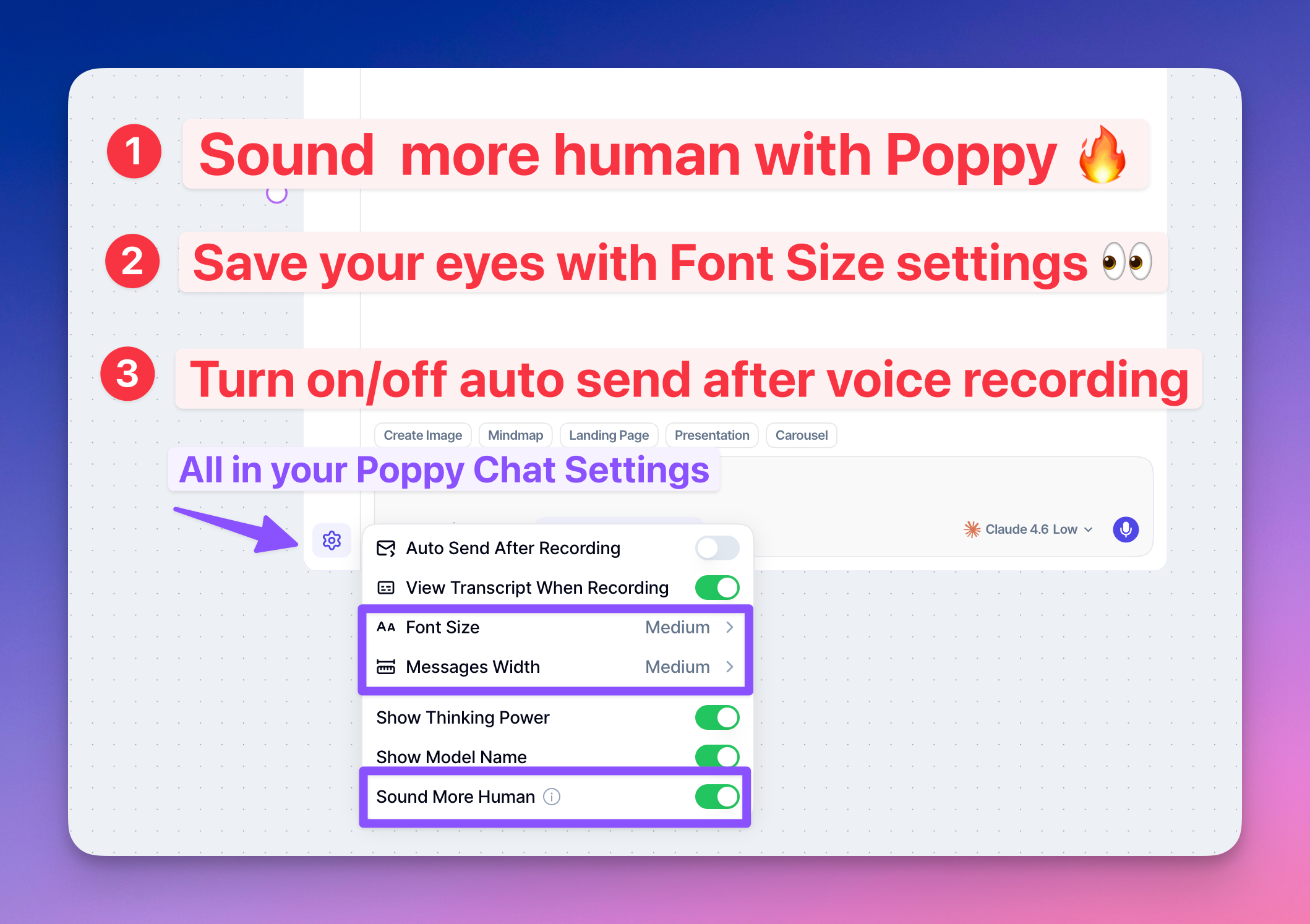
Poppy Chat Settings Are Here

👁️ Font size, go big, go small, you pick
↔️ Messages width, wide or focused, your call
🎙️ Auto send after voice recording, on or off
📝 View transcript while recording, totally up to you

The One I'm Most Excited About

One of our customers, Luca, sent us a prompt he personally built to make AI responses sound less robotic. No corporate stiffness, no weird sentence structures, no "it is worth noting that." Just normal human writing.

We loved it so much we turned it into a feature.

🤖 Sound More Human mode is now baked directly into Poppy. One toggle and it injects Luca's logic into every single response. Not perfect 100% of the time, but you will feel the difference immediately.

How To Get There

  1. Hit the ⚙️ gear icon inside Poppy Chat

  2. Make it yours

  3. Done

Drop a ❤️ if this one hits. Want more settings? feedback.getpoppy.ai, we read everything in there.

Love ya,
- Naz
Improved

👀 You Can Now PREVIEW Your Documents INSIDE Poppy

How many times have you uploaded a PDF to Poppy AI and then completely forgotten what was inside it?

Yeah. We know. We heard you. 😅

So we fixed it.


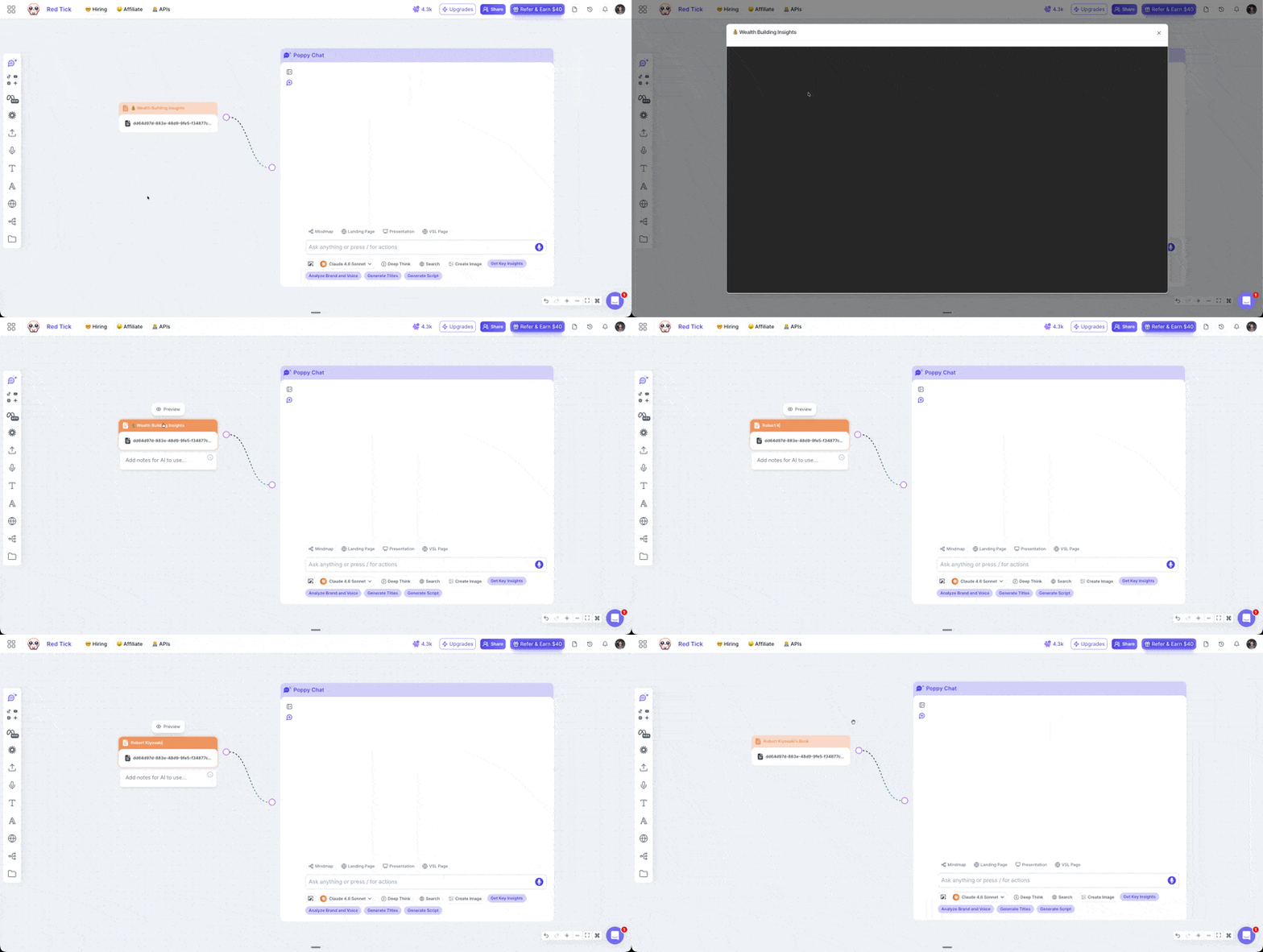
📄 Introducing: Document Preview on Poppy AI

You can now see exactly what's inside any document you upload to your board.

No more guessing.

No more "wait… which file was this again?".

No more asking Poppy “What’s inside this document?”

Just click preview and you’re done. ✅


🚀 What's New

PDF Preview

  • Upload any PDF to your Poppy AI board

  • Click on it and hit Preview

  • See exactly what's inside — instantly

Rename Your Files

  • Got a random file with a random name?

  • Rename it to something that actually makes sense

  • "Getting Rich Framework" hits different than "document_final_v3.pdf" 😂


🎯 How To Use It Right Now

  1. Go to any Poppy AI board

  2. Drag and drop your PDF

  3. Click on the file

  4. Hit Preview

  5. Rename it if you want 🔥

  6. That's it.


⚠️ One Thing To Know

This only works on new document uploads.

Your old documents won't have this but the fix is easy.

Just re-upload them to your board and you're good to go. ✅


Drop a ❤️ if I just helped improve your life.

And if you've got other small things inside Poppy AI you want improved, drop it in the comments. I'm reading every single one and building the ones that make sense.

Love ya,
-Amaanath

P.S. This feature was actually built by me with the help of Cursor Agents. I'm no developer. But with the right tools and an incredible team? Anything is possible. 🚀

Improved

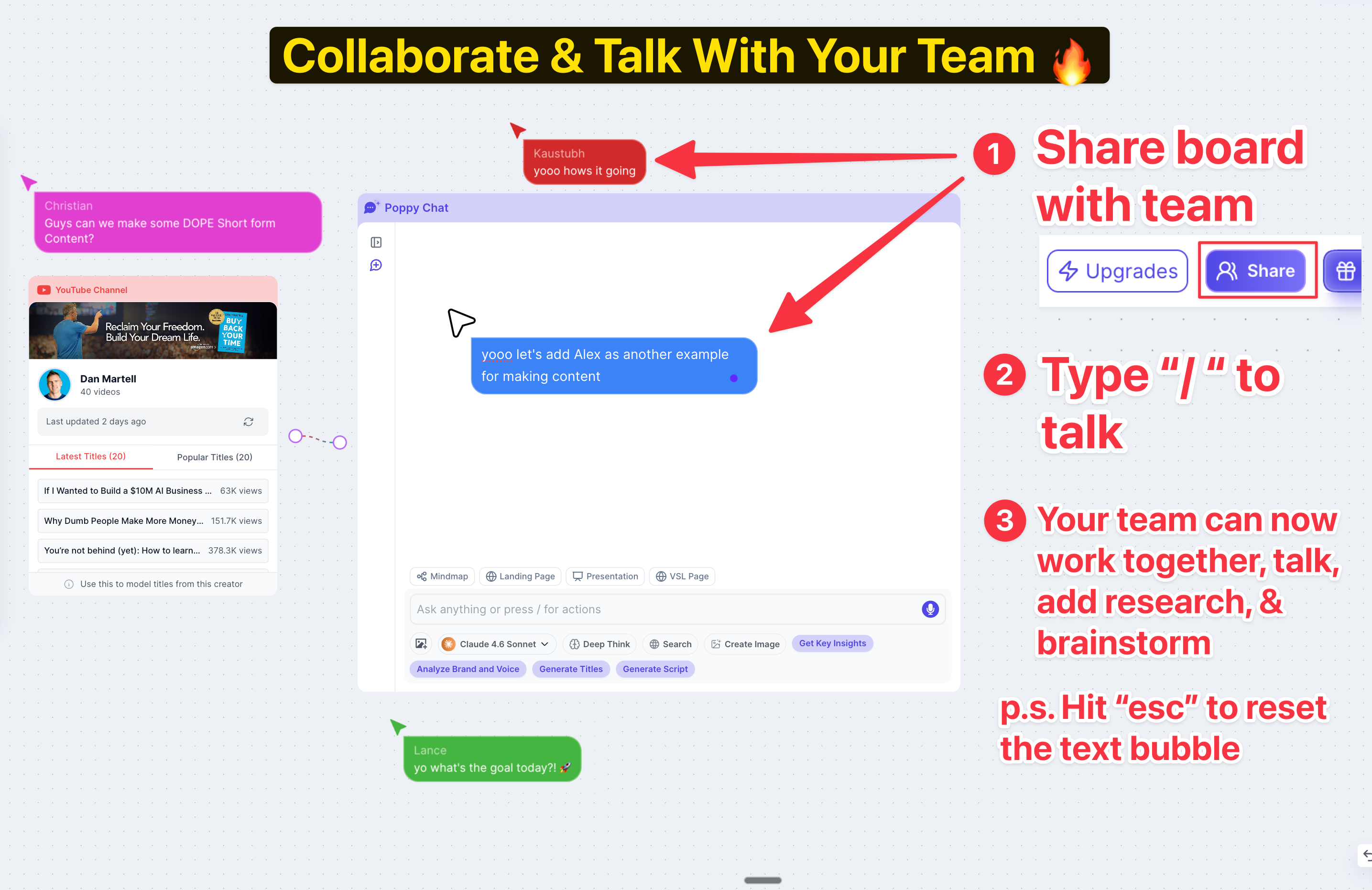
Working with your team just got fun 🥳

You know how Figma lets designers chat and work together in the same file?

you got those cute pointers that show up the second someone else joins in

We just brought that same experience to teams 🚀

As you know, you can already share your Poppy Board

But now…

you can also chat directly inside your Poppy board. In real time.

You can be like “Yooooo whats up guys“ haha

and your team can respond to you in real time

🛠️ HOW TO USE IT:

👉 Share your Poppy board with your team

👉 Type "/" to start chatting inside the board

👉 And just type (hit enter to go to next line)

👉 when your team types, you can see their message in real time

p.s. to reset the text bubble just hit “ESC“

I use it with my team internally and

It’s SO MUCH FUN!

🎯 NOW YOU CAN:

👉 Chat back and forth with your team inside the board

👉 Ask questions while collaborating in real time

👉 Bring in research together

👉 Talk with AI as a team

👉 Brainstorm and create content together

WE WANT TO make Poppy even better for teams! 💪

Please comment your suggestions below👇

Love ya,
- Naz

Improved